If you are on this page it is because you have decided to delete your Vitalfit account. We are sorry to hear that you are not satisfied with our application. If there is anything we can do to change your mind or improve Vitalfit, you can write to us at web@vitalfit.app.
What account deletion entails.
As you know, Vitalfit collects health data to propose your physical activity program. Spanish law requires service providers to keep this information for at least 5 years. Therefore, we cannot delete the data or unlink it from your user. Instead, Vitalfit records the date of the request for account deletion so that, after the mandatory retention period, we can delete your medical history, email and physical activity log at the appropriate time.
How to delete an account.
Vitalfit integrates account deletion directly into the application. To delete your account:
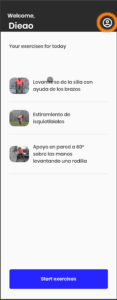
- tap on the icon shown in image 1.
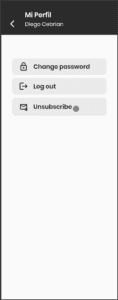
- Then, in your account, select “Delete account”.
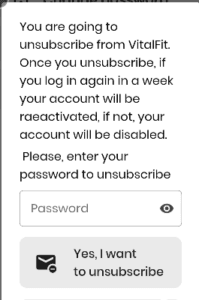
- Vitalfit will ask you for your password to prevent anyone from deleting your account on your behalf.
I deleted my account by mistake
Don’t worry. There is a 7-day period in which you can recover your account by simply logging back into the application. If you can no longer log in, write to us at web@vitalfit.app and we will help you recover your account and data.